
By 2025, livestreaming will be an integral part of the digital media world: gaming streams, IRL content, podcasts, reaction formats, and professional studio productions—everything will run on software that manages images, sound, and scenes and transmits them live to Twitch. But which streaming software will really be the best in 2025? And which is suitable for beginners, advanced users, or professionals?
This guide provides a comprehensive comparison of all relevant tools, including performance, range of functions, multistreaming, usability, and specific recommendations based on experience level. This guarantees you'll find the software that suits your streaming style.
What is streaming software and why do you need it?
Streaming software is the central tool that Video, audio, and scenes processed, encoded, and finally broadcast live on Twitch. Without them, streaming would not be possible at all.
Typical tasks performed by the software:
- Capture gameplay, webcam, browser sources, and audio
- Scene & Transition Management
- Encoding (e.g., x264, NVENC, AV1, AMF)
- Integration of widgets, alerts, and overlays
- Setting the streaming quality (bitrate, keyframe, FPS, resolution)
- Management of separate audio sources
- Multistreaming to multiple platforms
Choosing the right software has a huge impact:
- image quality
- CPU/GPU utilization
- Stream stability
- Delays
- Overall user-friendliness
The best Twitch streaming software in 2025 – a detailed comparison of all programs
OBS Studio review – The best Twitch streaming software in 2025
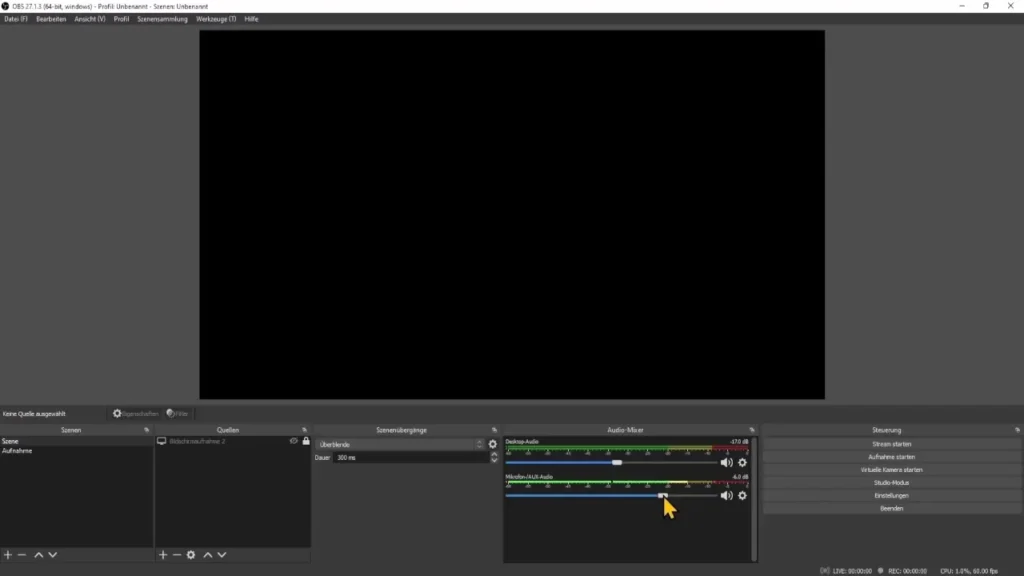
OBS Studio will remain the gold standard in 2025. Free, open source, extremely flexible, and constantly improving.
| Advantages of OBS Studio | disadvantages |
|---|---|
| -100 % free of charge, no paywalls | -appears technical for beginners |
| -maximum stability | -No integrated overlay library |
| -Best encoding (NVENC, AV1, AMF, x264) | -Multistream only via third-party providers |
| -Very low CPU usage | |
| -Huge plugin ecosystem |
Who is it suitable for?
For everyone, who want maximum quality, control, and stability.
Streamlabs Desktop – The simplest all-in-one solution
Streamlabs is based on OBS, but has been greatly expanded and visually modernized.
| benefits | disadvantages |
| -Very simple setup | -higher CPU load than OBS |
| -Large integrated overlay library | -many features only available with expensive Ultra subscription |
| -Alerts, chat, event manager directly integrated | -less flexible |
| -Cloud backups & cloud scenes | -controversial in the tech scene |
| -Mobile Remote App | |
| -Multistreaming possible (but only with Ultra subscription) |
Who is it suitable for?
For creators who want to configure as little as possible themselves.
Twitch Studio – The best software for absolute beginners
Twitch Studio is aimed at users who want to get started right after installation.
| benefits | disadvantages |
| -Extremely simple setup | -very limited |
| -automatic audio optimization | -no professional encoding |
| -integrated scene templates | -no plugins |
| -ideal for complete beginners | -no multistream |
Who is it suitable for?
For newcomers, who just want to go live quickly.
Prism Live Studio – The best free multistream software in 2025
Prism experienced significant growth in 2024/2025, particularly through TikTok integration.
| benefits | disadvantages |
| -Free multistreaming (3 platforms simultaneously) | -fewer technical fine adjustments |
| -TikTok & Instagram Live integration | -Not ideal for high-end setups |
| -mobile app for IRL streams | Data policy partially unclear |
| -Integrated overlays, effects, and AI tools | |
| -good performance |
Who is it suitable for?
Creator on multiple platforms and IRL streamer.
XSplit Broadcaster – The professional solution for business streams
| benefits | disadvantages |
| -Extremely high video quality | expensive (license model) |
| -professional tools (studio switching, macros, etc.) | -Not ideal for gaming |
| -Powerful audio control | -high CPU load |
| -Suitable for webinars and corporate productions |
Who is it suitable for?
Business applications, webinars, and production environments.
Lightstream – The best solution for console streamers without a PC
| benefits | disadvantages |
| -runs entirely in the cloud | -monthly costs |
| -perfect for PS5 & Xbox | -Internet addiction |
| -No powerful PC required | -limited flexibility |
| -Multistream possible |
Who is it suitable for?
Console streamer without capture card.
NVIDIA Broadcast – The perfect AI addition to your stream
Not streaming software, but extremely valuable:
- AI noise reduction
- echo filter
- Auto framing
- virtual background
→ Perfect in combination with OBS or Prism.
Direct comparison: Which streaming software will truly be the best in 2025?
| Category | Winner 2025 | Why |
| Best overall software | OBS Studio | Best performance, best control, free of charge, plugins |
| For beginners | Twitch Studio / Streamlabs | very easy to use |
| For multistreaming | Prism Live Studio | free and stable |
| For Mobile & IRL | Prism Live App | Powerful app & effects |
| For consoles | Lightstream | Streaming without a PC |
Important differences between the programs
user-friendliness
- Twitch Studio → easiest
- Streamlabs → modern, visually appealing
- OBS → Technical, but unbeatably flexible
performance
- OBS → Most efficient CPU/GPU usage
- Prism Live → solid, medium load
- Streamlabs → most resource-intensive
Encoding & Image Quality
OBS offers the best options:
- NVENC (H.264 & AV1)
- AMF
- x264
- Complete control over B-frames, profiles, keyframes, etc.
Overlays & Branding
- Streamlabs → best integrated library
- Prism → many effects & powerful on the go
- OBS → only via plugins
Audio & Sound Quality
OBS scores with:
- VST plugins
- precise audio mixing
- monitoring options
Streamlabs offers easy access but less depth of detail.
Multistreaming – Which software will truly be able to serve multiple platforms simultaneously in 2025?
| Software | Free of charge? | Multistream? | special features |
| Prism Live | Yes | Yes (3 platforms) | best free solution |
| Streamlabs | No | Only with Ultra | expensive |
| Lightstream | No | Yes | cloud streaming |
| OBS | - | Only via Restream | Third-party provider required |
| Twitch Studio | - | No | no multistream option |
Important: Since 2023, Twitch has allowed multistreaming for all creators – so it's completely legal.
Common mistakes when choosing streaming software
- Using Streamlabs even though your PC isn't powerful enough
- set bit rate too high
- Overlays overload the system
- Incorrect encoding (e.g., x264 on a weak CPU)
- unclear scene structure
- missing audio mixing
Conclusion: Which streaming software should you really choose in 2025?
If you are unsure, here is our clear recommendation:
- Absolute beginners: Twitch Studio
- Ambitious creators: Streamlabs
- Professional streams & maximum quality: OBS Studio
- Multistreaming: Prism Live
- Mobile & IRL: Prism (app)
- Consoles without a PC: Lightstream
If image quality and performance are important to you, there's no way around OBS Studio in 2025. For beginners, Twitch Studio is the easiest solution, while Prism Live excels especially for multistreaming and mobile creators. Streamlabs is suitable if you want a quick all-in-one package.
FAQ
OBS Studio, because of the best encoder control.
Prism Live Studio.
Yes.
PS5 & Xbox: Services such as Lightstream allow you to stream without a capture card.
PC: The standard game capture function in OBS, Streamlabs, or Prism is sufficient here—a capture card is not necessary as long as you are streaming directly from your PC.
For complete beginners, Twitch Studio The easiest choice, as it is set up automatically and requires little technical knowledge. Streamlabs is also well suited for beginners who want a modern interface and many integrated features.
The best image quality is provided by OBS Studio, as it offers the most encoder settings and allows maximum control over bitrate, profile, keyframes, and AV1 or NVENC encoding.
OBS Studio is the most CPU-friendly. The optimized architecture and efficient use of hardware encoding (NVENC, AMF) ensure excellent performance—ideal for less powerful PCs.
Yes, but not directly. With OBS, you can use RTMP to TikTok, provided you have a TikTok stream key. Alternatively, tools such as Prism Live Studio Direct TikTok integration without additional setup.
There is definately a lot to find out about this subject. I like all the points you made